

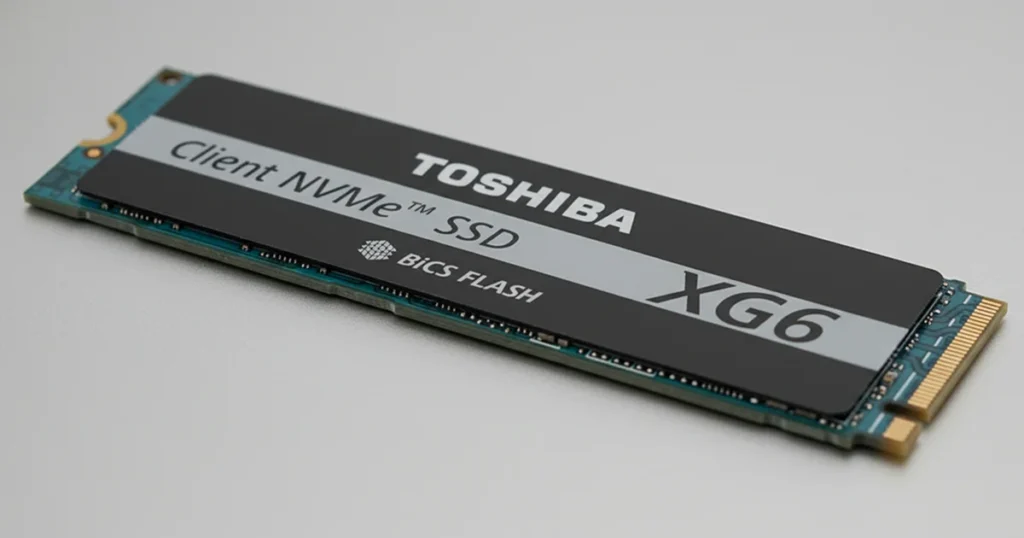
A water spill can take a laptop down in seconds, but the bigger risk is what happens next inside the NVMe SSD: corrosion, short circuits, and silent component failure.
This case study breaks down how a Toshiba XG6 NVMe M.2 SSD failed after liquid exposure, what our lab found during evaluation, and how we recovered and verified the client’s business critical files.

Client Situation and Incident Overview
A small business owner in Liverpool depended on a work laptop for day to day operations, with a Toshiba XG6 NVMe M.2 SSD serving as the primary storage device. The SSD contained business documents and operational files needed to keep work moving without interruption.
While working from home, the client accidentally spilled water on the laptop. The system shut down abruptly, and subsequent restart attempts failed.
With the laptop unable to boot and the SSD data inaccessible, the priority shifted from troubleshooting to protecting the data and assessing the damage under controlled lab conditions.
Industry Certifications
Trusted by leading organizations and certified by industry authorities



Problem: Water Spill, Corrosion, No Boot
After the spill, the laptop shut down without warning. When the client attempted to restart, the system would not boot, and there was no normal path to access the files stored on the Toshiba XG6 NVMe M.2 SSD.
This failure pattern typically indicates more than a simple software issue. With liquid exposure, the primary risks are corrosion across components and short-circuited circuitry.
Either condition can prevent the SSD from initializing properly, which blocks the laptop from booting and makes the data effectively inaccessible.
What was at risk
- Business documents and operational files stored on the internal SSD
- Potential progressive damage if the device continued to be powered on after exposure
If the SSD is not appearing at all, learn more about SSD not showing up in Disk Management.

Diagnostic Highlights: What We Found During Evaluation
Once the SSD was received, our technicians performed a controlled evaluation focused on liquid exposure impact and electrical integrity.
Key findings
- Evidence of corrosion on multiple components consistent with water contact
- Signs of short-circuited elements, indicating electrical failure rather than a simple file system issue
- The SSD could not operate normally in its original state, meaning standard access methods were not viable
Why this mattered
With corrosion and short circuit damage present, continued power attempts would not improve access. The recovery strategy had to shift to hardware-level handling with a focus on preserving the NAND stored data.
Don't Let Data Loss Ruin Your Business
Minimize business disruption. We retrieve lost data fast, so you can focus on what matters.
Recovery Process: NAND Chip Transplant to a Donor SSD
Because the Toshiba XG6 NVMe M.2 SSD had liquid-related component failure, the recovery path required chip-level intervention rather than logical repair.
Stabilize and document the device condition
Initial handling focused on preventing further corrosion spread and avoiding unnecessary power cycles.
Source a compatible donor SSD
An identical Toshiba XG6 NVMe M.2 SSD was acquired to serve as the donor platform for controlled reconstruction.
Remove NAND chips from the damaged SSD
The original NAND chips were carefully removed using precision equipment to avoid heat or handling damage.
Prepare the donor SSD
The donor board was readied to accept the original NAND components and support controlled access.
Transplant original NAND onto the donor
Technicians installed the client’s original NAND chips onto the donor SSD to enable extraction attempts.
Extract and validate data
Data was pulled in a controlled manner, then checked for integrity and completeness before any client confirmation step.
Risk note:
Do not attempt drying with heat, repeated boot attempts, or cleaning with household chemicals. These actions commonly worsen corrosion and reduce recovery options.
If you are deciding whether professional recovery is feasible for an NVMe SSD, read more about whether you can recover data from an SSD.

Risk Notes: What Not to Do After Liquid Damage
Liquid damage is time-sensitive. The wrong next step can convert a recoverable SSD into a non-recoverable one.
Avoid these actions
- Do not power it on repeatedly. Every power cycle can trigger new shorts and expand corrosion pathways.
- Do not plug the SSD into adapters or enclosures to “see if it shows up.” Unstable power delivery can worsen electrical damage.
- Do not use heat guns, hair dryers, or ovens. Heat can warp components and degrade solder joints.
- Do not use rice or desiccant as a “fix.” It does not remove corrosion or contaminants from the board.
- Do not apply alcohol or cleaning sprays without proper process. Incorrect solvents and brushing can lift components or smear contamination.
Best immediate action
- Power down, stop testing, and move to controlled evaluation. The goal is to prevent secondary damage before diagnostics.
Industry-Leading 99% Success Rate
No hidden fees. No surprises. Just expert data recovery you can trust. We handle everything from simple file loss to extreme data recovery cases. If we can’t recover your data, no one can.
Result: Data Verification and Client Confirmation
After extraction, the recovered data was checked for integrity and completeness to confirm the dataset was usable, not just readable.
To finalize verification, we scheduled a remote session with the client and reviewed the recovered content together. The client confirmed that critical business files were present and accessible, enabling them to resume normal operations with minimal disruption.

Conclusion: Stop Further Damage and Get an Evaluation
A water spill can trigger corrosion and short circuits fast. If your laptop will not boot and the Toshiba XG6 NVMe SSD data is inaccessible, stop powering it on. Extra attempts usually make the damage worse.
If you need recovery, we can evaluate the SSD, explain what failed, and provide a fixed quote. You pay only if recovery is successful.
Learn more about SSD data recovery service: SSD data recovery service
Emergency Data Recovery Services
Unexpected data loss? Whether it’s a crashed system, failed storage device, or accidental deletion, our 24/7 emergency recovery service ensures priority assistance to retrieve your critical data.